

Stop Googling. Start Thinking.
Using AI Properly.
Most people use ChatGPT like a search engine with sentences. That's why they get generic answers, shallow solutions, and frustration. The right way is to let it help you think — not think for you.
I was recently solving a deep technical problem — the kind where the answer isn't on Stack Overflow and the documentation is vague. I went to ChatGPT, but not to get "the answer". I went to think out loud.
What surprised me was that the best results came when ChatGPT didn't give me the answer. The best results came when it treated my thinking as almost right.
That turned the whole interaction into something different. Not a search. A conversation. And by the end of it, I'd solved the problem myself.
The Problem
You're Using It Like Google
Most people approach ChatGPT the same way they approach a search engine. Type a question. Expect an answer. Move on.
That works for trivia. It works terribly for real work.
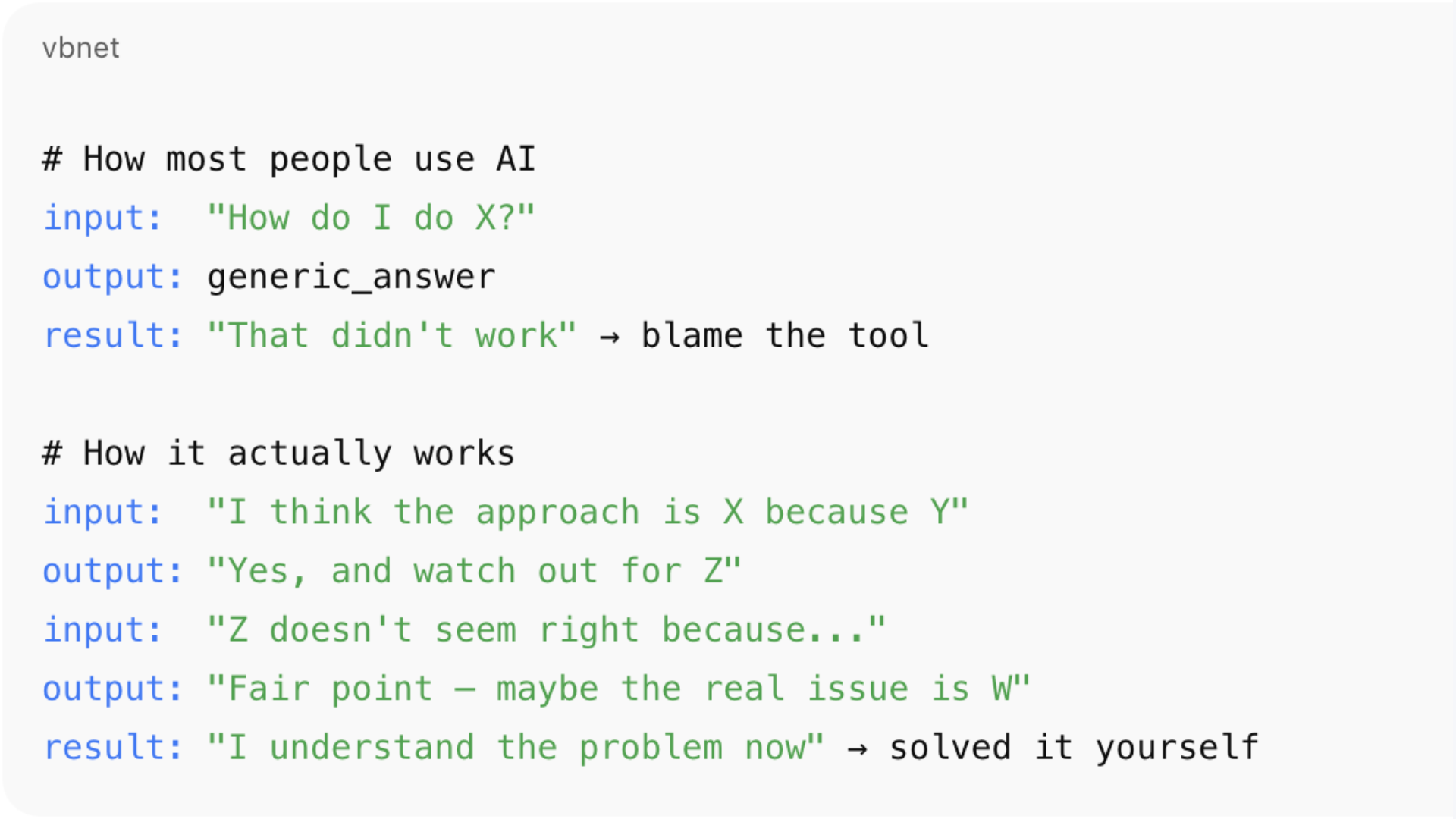
How most people use it
Put a question in. Expect a correct answer out. Get frustrated when the answer is technically correct but practically useless. Blame the tool.
How it actually works best
Bring your half-formed ideas. Let it push back. Argue with it. Refine as you go. Walk away understanding the problem better than when you started.
Real work is messy. The question you ask is usually not the question you actually need answered. And the first solution is almost never the right one.
The Pattern
Why It Keeps Saying "You're On The Right Track"
One thing you'll notice quickly is that ChatGPT often starts responses with something like "Good instinct", "You're on the right track", or "That makes sense, but…"
That's not accidental. It's optimised to engage constructively, preserve momentum, and avoid shutting down partially correct reasoning.
In other words, it treats your input as a hypothesis, not a verdict. If your idea is 70% right, it won't say "wrong" — it will say "yes, and…"
What's exactly what you want if you're solving complex problems. But it can feel frustrating if you expect the answer to just pop out first time.
The trick is to use this behaviour deliberately. Not as a flaw to work around, but as a feature to exploit.
The feedback loop that actually works
You propose a solution
Bring your thinking, not just your question. Even if it's half-baked.ChatGPT responds as if it might be correct
It validates the useful parts and builds on them rather than rejecting outright.It points out edge cases, risks, or alternatives
The "yes, and…" — the part that makes your thinking sharper.You react, refine, or push back
Test what it said. Disagree. Try a different angle. This is where the value is.The solution improves
Each round sharpens the edges. The answer gets more specific, more practical.
✓ You solve the problem — with help
You understand why it works. You can explain it. You own the solution.
Repeat steps 1–5 as many times as needed.
In the old days we called this a cardboard developer. Explain your problem to a cardboard cutout and you'll often solve it yourself. More recently, people call it rubber ducking. Same principle — except now the duck talks back and is occasionally useful.
A real example
The HubSpot Problem
Let me make this concrete. I wasn't trying to do anything exotic. I just wanted to answer a simple-sounding question in HubSpot:
"In September, which deals were in which stages? And if the same deal closed in October, I want to see it again in October." — The question that started it all
That sounds like a reporting question. It isn't. It's a data-model question disguised as a report. At the start, I didn't know that yet.
So I asked ChatGPT something along the lines of how to build a "deal stage by month" report. The response didn't say "yes, do X" or "no, that's impossible." It said something closer to:
What you're describing is a stage snapshot over time. That's trickier than it sounds in HubSpot.
That was the first useful thing. Not an answer — a reframing.
Where it got interesting
Almost Right, Over and Over
I went down what felt like the correct path. I asked about using HubSpot's "date entered stage" fields. ChatGPT agreed - mostly. It said, essentially:
Me: I'll use the "date entered stage" fields to track which deals were where each month
ChatGPT: Yes, you're thinking about the right field. But be careful, there are two versions, and only one of them is reliable.
At that point, I thought I had it. I didn't.
When I tested it, the numbers were wrong. So I went back and said "that doesn't seem right."
This is where the interaction got interesting. Instead of insisting it was correct, ChatGPT shifted. It started exploring why it might be wrong. It suggested that system-generated history rows could be polluting the data.
Then I tested that idea and that didn't fully work either. So I pushed back again. And again.
Every time I did, the explanation sharpened.
The real problem surfaces
I Was Asking The Wrong Question
Eventually, we hit the real issue — and it wasn't the field, or the filter, or the SQL. It was the question.
What I thought I was asking
"Which deals entered which stage in a given month?"
What I was actually asking
"Which deals were in which stage during that month?"
Those are not the same thing. One is event logic. The other is interval logic. Once that distinction clicked, everything else fell into place — filtering stopped working the old way, event logic stopped making sense, and the right approach became obvious.
That wasn't a fact ChatGPT handed me. That was something that emerged from the back-and-forth.
The outcome
I Solved It Myself
By the end of the conversation:
Not copying suggested code blindly
I'd tested, broken, and rebuilt the approach multiple times.Not "trusting the model"
I'd argued with it at every step and forced it to sharpen its reasoning.Able to explain why HubSpot reports behave the way they do
Not because ChatGPT told me — because I'd worked through it.Able to design the solution myself
I owned the answer. I could defend it, modify it, extend it.
ChatGPT didn't solve the problem for me. It stayed just close enough to correct that I could keep pushing on it and in doing so, I solved it myself.
That's the part most people miss.
The actual value
Collaboration, Not Search
The value wasn't in getting the right answer quickly. It was in having something that responded constructively to half-formed ideas, didn't shut down wrong paths too early, adjusted when challenged, and helped surface the real question underneath the obvious one.
That's not search. That's collaboration.
And if you treat it that way, if you argue with it a little, you'll often walk away understanding the problem better than if you'd been given the "correct" answer upfront.
So what does this mean at work?
Stop Treating AI Like a Vending Machine
The mistake people make with AI at work is expecting it to be a vending machine. You put a question in. You expect a correct answer out.
That works for trivia. It works terribly for anything that matters.
What worked for me in this example wasn't that ChatGPT was "smart." It was that it was willing to engage with incomplete thinking and I was willing to push back. That combination matters.
If you want to use AI well at work
Bring your thinking, not just your questions. Treat its responses as drafts, not conclusions. Challenge it when something feels off. Let the conversation evolve instead of chasing a final answer.
Used this way, AI doesn't replace judgment. It sharpens it.
The Best Signal That It's Working
By the end of the conversation, you don't feel like the AI solved the problem.
You feel like you did.
That's the version of AI that actually belongs in real work.
"The best use of AI isn't getting answers — it's asking better questions."
Written from experience, not theory.